
AI agent · Finance
AI bookkeeping that keeps the books current, with a person approving anything unclear
AI bookkeeping is the daily job of the Finance Agent we run in Microsoft Teams. It books what matches the rules our finance team sets, reconciles payouts and sends everything else to a person. Below: how it works, and its live log, misses included.
Built and run in our own business
Works with your team in Microsoft Teams. Can be powered by OpenAI, Anthropic, Google or open-source models.
Live in our business
38%of this agent’s work automated
Its specialists
- BookkeepingLive
- ComplianceLive
- CSP BillingLive
- DepartmentFinance
- Tasks this month100–500
- Last activeToday
- Talk to it inMicrosoft Teams
Live from our own systems, updated every hour. See the activity log
The problem
Without AI bookkeeping, the books fall behind
Every bank line, card charge and payout has to be labeled and matched before the numbers can be trusted, and filing deadlines do not move when the month gets busy. AI bookkeeping takes the routine matching off the team.
Short answer
The Finance Agent is our AI agent for bookkeeping and finance compliance. Bookkeeping labels new bank and card lines, matches payments to invoices and bills and reconciles card-processor payouts, acting alone only when a line exactly matches a rule our finance team set. Compliance tracks filing deadlines and cross-checks sales tax collected against tax filed. Anything outside the rules goes to a person as an approval card in Microsoft Teams, a person files every return, and every action is logged.
What it does
What our AI bookkeeping agent does
Proof from our own business
What it actually did
Straight from the audit log the agent writes on every action, for every specialist. Filter by specialist or by outcome; the misses are shown as plainly as the wins.
Live log · last 7 days · updated Nov 18, 2026, 10:14 ET · times in ET
Wed, Nov 18
Tue, Nov 17
Mon, Nov 16
Sun, Nov 15
Sat, Nov 14
Fri, Nov 13
Approvals
Where a person stays in charge
The agent acts on its own only within rules we set. Anything that affects a customer, money, a bid or a candidate waits for a person.
A person approves the exceptions
Any line outside the rules, and any change to a customer or vendor balance, waits for a person.
Expired means nothing happens
If no one decides in time, the proposal expires and nothing is booked. It comes back for review.
People file every return
Compliance flags and prepares; a person reviews and files each return.
Every action logged
Each step, tool call and approval is written to the audit log, which feeds the activity log on this page.
Switched off in one step
Each agent has a daily cost cap and a kill switch, and is pinned to one model tier, so cost and behavior stay predictable.
See where an agent like this fits in your business
A free AI readiness assessment shows which process to automate first, what data it touches and who should approve its work.
In Microsoft Teams
Talk to the AI bookkeeping agent in Microsoft Teams
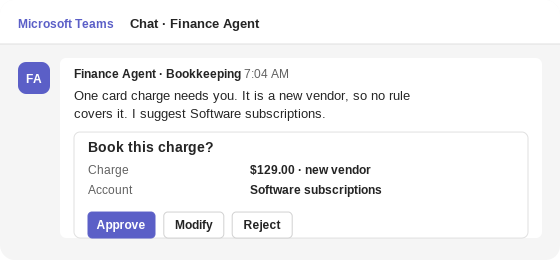
Anything outside the rules comes to the right person as an approval card in a one-to-one Teams chat. They approve, modify or reject it without leaving Teams. Approvals use Microsoft Teams Adaptive Cards, so they work on desktop and mobile.
One card charge needs you. It is a new vendor, so no rule covers it. I suggest Software subscriptions.
- Charge
- $129.00 · new vendor
- Account
- Software subscriptions
Illustration with sample data.
Specialist · Bookkeeping
Bookkeeping: AI bookkeeping for bank, card and payout activity
Bookkeeping labels new bank and card lines, matches payments to invoices and bills, pairs transfers between our own accounts and reconciles card-processor payouts. It acts on its own only when a line exactly matches a rule our finance team set. Anything else goes to a person as an approval card in Microsoft Teams, and if no one decides in time, nothing is booked.
LiveBookkeeping · part of the Finance Agent
Keeps the books current every day: bank, card and payout activity matched and booked within rules our finance team sets, and anything outside them sent to a person. Month-end without the backlog.
What it works on
- Bank categorization rules
- Online payment reconciliation
- Company card expenses
- International payment fees
- Receivables
- Billing inbox
Specialist · Compliance
Compliance: filing deadlines tracked and sales tax cross-checked
Compliance tracks filing deadlines and cross-checks the sales tax we collected against the tax we filed, so nothing is missed. A person reviews and files every return.
LiveCompliance · part of the Finance Agent
Tracks filing deadlines and cross-checks sales tax collected against tax filed, so nothing is missed. A person reviews and files every return.
What it works on
- Filing calendar
- State coverage check
Scope
AI bookkeeping, and what stays with your accountant
AI bookkeeping takes over the daily, rule-based part of the books: labeling bank and card lines, matching payments to invoices and bills, reconciling payouts and chasing overdue invoices with reminders a person approves. The judgment stays with people. Your controller writes the rules the AI bookkeeping agent follows, approves every exception, closes the month and signs off the accounts. Your accountant keeps the year-end work, tax advice and anything that needs professional judgment, and Compliance only tracks deadlines and cross-checks what was collected against what was filed. The result is AI bookkeeping that keeps the ledger current every day, with the decisions still made by your finance team.
Specialist · CSP Billing
CSP Billing: monthly Microsoft CSP invoices, checked against last month
CSP Billing prepares the monthly Microsoft CSP billing from the Microsoft Partner Center invoice and our distributors’ invoices, and checks every customer against last month. A person approves every invoice and bill before it is posted.
LiveCSP Billing · part of the Finance Agent
Prepares the monthly Microsoft CSP billing from TD SYNNEX's invoices and checks every customer against last month. A person approves every invoice and bill before it is posted.
Behind the agent
Automations behind the Finance Agent
Scheduled jobs and integrations that work next to the agent. These follow fixed rules rather than AI.
For your business
Put an agent like this to work for your team
Most finance teams start with bank reconciliation or matching bill payments, the repetitive work that eats month-end. We build the agent on your Microsoft Azure, connect it to your accounting system through its API, and set the rules with your controller before it acts on anything. Each agent can be powered by OpenAI, Anthropic, Google or open-source models, chosen per task, and we tell you where each model processes your data. It is one of the AI agents for business we run in our own company every day.
Bank reconciliation
Lines that match your rules are booked; the rest arrive as approval cards.
Accounts payable matching
Bills and payments matched by reference, with mismatches flagged.
Collections follow-up
Reminders drafted from your aging report, sent only after approval.
| Engagement | Typical timeline | Investment |
|---|---|---|
| AI readiness assessment | About one week | Free |
| First agent pilot: one process, shadow mode | 4–6 weeks | $14,900 |
| Production agent with integrations and approvals | 6–10 weeks | $24,900–$49,900 |
| Managed AI operations | Monthly | From $1,900 a month |
Want a figure for your organization? Get an estimate in 2 minutes with our pricing calculator.
Prices are our standard US list prices for commercial clients. Model usage is billed at cost and capped per agent per day.
Common questions
AI bookkeeping: questions finance teams ask
Does an AI bookkeeping agent work with QuickBooks?
It can. The agent connects to an accounting system through its API, the way ours connects to our own ERP, and QuickBooks Online has one (Intuit Developer: QuickBooks Online API). We confirm the connection and which actions it may take during the free assessment, before the agent books anything.
Can AI do bank reconciliation?
Yes, within rules. Our agent reconciles card-processor payouts against the payments and fees inside them every 2 hours and books bank and card lines that exactly match a rule. AI bank reconciliation still leaves the judgment calls to a person: anything that does not match arrives as an approval card in Teams.
Can AI bookkeeping replace a bookkeeper?
Not on its own. AI bookkeeping replaces the repetitive entry and matching work, so a bookkeeper or controller spends the day on exceptions, rules and month-end instead of typing. Our AI bookkeeping agent books only what matches a rule your team approved, and every exception still goes to a person.
Is an AI agent for accounting safe with financial data?
It runs on Microsoft Azure, acts only on lines that match rules your finance team approved, and logs every action. Prompts and outputs are not used to train the models, and each agent has a daily cost cap and an off switch.
Which AI models does the agent use?
It can be powered by OpenAI, Anthropic, Google or open-source models, chosen per task. OpenAI, Anthropic and open-source models run in Microsoft Foundry on Azure; Google’s Gemini models run on Google Cloud. We tell you which model is used and where it processes your data before work starts, and prompts and outputs are not used to train the models.
Questions buyers ask
Before you decide
Does the agent post entries without approval?
Only when a line exactly matches a rule your finance team approved in advance. Everything else waits for a person, and you can require approval for every entry while you build trust.
What happens if nobody approves a proposal?
It expires and nothing is booked. The item comes back for review, and the activity log shows it as expired, not as a success.
Which accounting system does it work with?
Ours runs on our ERP. For clients, we connect to the accounting system you already use through its API and confirm the connection during the free assessment.
Find the first process worth automating
Start with a free AI readiness assessment: we look at where AI is in use, what data it touches and which process to automate first.

