
AI agent · AI Command Center
AI agent orchestration in Microsoft Teams: one command center that runs, governs and audits every agent
AI agent orchestration is what our AI Command Center does all day. It switches each agent on or off, holds its budget, routes approvals to the right person in Microsoft Teams and triages every inbox before the other agents start work.
Built and run in our own business
Works with your team in Microsoft Teams. Can be powered by OpenAI, Anthropic, Google or open-source models.

Live in our business
38%of this agent’s work automated
27% of our business’s work is automated by our agents (measured Oct 21, 2026)
Agents with fewer than 50 tasks are counted at their measured level, but show “Too early to measure” on their own pages.
Its specialists
- DepartmentAI Command Center
- Tasks this month1,000+
- Last activeToday
- Talk to it inMicrosoft Teams
Live from our own systems, updated every hour. See the activity log
Short answer
The AI Command Center is our AI agent platform and the first agent in Microsoft Teams. It registers, configures and monitors every agent: pinned model tiers, approval rules, daily cost caps, an audit log and a kill switch for each one. Its Triage specialist sorts every incoming request across the Sales, Billing and Client Services inboxes so each agent only works the tickets routed to it. Agents reach business systems through a governed tool gateway with department-level permissions, and their credentials stay in Azure Key Vault.
What it does
What our AI agent orchestration covers
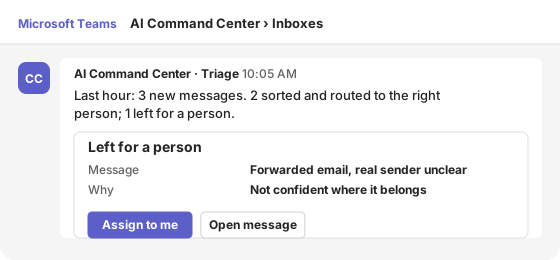
In Microsoft Teams
Talk to the AI command center in Microsoft Teams
The Command Center reports in its own Teams channel and answers when someone tags it. Approvals from every agent arrive as Microsoft Teams Adaptive Cards, so they work on desktop and mobile.
Last hour: 3 new messages. 2 sorted and routed to the right person; 1 left for a person.
- Message
- Forwarded email, real sender unclear
- Why
- Not confident where it belongs
1 reply
Illustration with sample data.
Specialist · Triage
Triage: every inbox sorted before the other agents start work
Triage reads every incoming request the moment it arrives, across the Sales, Billing and Client Services inboxes, and sorts it for the right person or agent. It removes spam and moves misfiled tickets to the right inbox, such as a sales inquiry sent to support. Clear rules go first, then a fast AI model, with a stronger model only for the hard cases. Anything it cannot place with confidence is left for a person. People write every reply.
LiveTriage · part of the AI Command Center
Reads every incoming request the moment it arrives and sorts it for the right person, so enquiries are answered faster. People write every reply.
What it works on
- Inbox triage: Sales, Billing, Client Services
- Spam
- Re-routing misfiled tickets
The platform
What an AI agent platform needs before it runs real work
Every agent on these pages runs through the same AI command center. These are the controls it holds for each one.
Phone
AI phone agent and AI receptionist: where calls fit in
Our AI phone agent is in pilot on our own phone lines. It answers calls, puts callers through to whoever is free in Microsoft Teams and, when nobody is, takes the message straight into our helpdesk or CRM so it is followed up. It runs on the same command center as the chat agents, with the same tools and approval rules, so a call and a Teams message are handled the same way.
PilotPhone · part of the AI Command Center
Answers our phone lines, puts callers through to whoever is free and, when nobody is, takes the message straight into our helpdesk or CRM so it is followed up.
What it works on
- Receptionist: answers and routes calls
- Support line
- Sales line
- Billing line
- Call summaries
Live record
What it actually did
Straight from the audit log the agent writes on every action, for every specialist above. Filter by specialist or by outcome; the misses are shown as plainly as the wins.
Live log · last 7 days · updated Oct 21, 2026, 19:28 UTC · times in UTC
Wed, Oct 21
Tue, Oct 20
Mon, Oct 19
Fri, Oct 16
Thu, Oct 15
Human control
Where a person stays in charge
The agent acts on its own only within rules we set. Anything that affects a customer, money, a bid or a candidate waits for a person.
Unclear means a person decides
Triage routes only when it is confident; the rest is left for a person.
Every action logged
Each step, tool call and approval is written to the audit log, which feeds the activity log on this page.
Switched off in one step
Each agent has a daily cost cap and a kill switch, and is pinned to one model tier, so cost and behavior stay predictable.
Behind the agent
Automations behind the AI Command Center
Scheduled jobs and integrations that work next to the agent. These follow fixed rules rather than AI.
For your business
Put an agent like this to work for your team
If you run more than one agent, or plan to, the hard part is not the first agent but keeping every agent governed. We set up the same command center in your Microsoft tenant: one switch, budget, approval route and audit log per agent, all managed from Microsoft Teams. Each agent can be powered by OpenAI, Anthropic, Google or open-source models, chosen per task, and we tell you where each model processes your data. It is one of the AI agents for business we run in our own company every day.
Agent governance
Switches, budgets and approval rules for every agent, in one place.
Shared inbox triage
Every inbox sorted and routed before people or agents pick it up.
Cost and activity reporting
What each agent did, what it cost and what waited for a person.
| Engagement | Typical timeline | Investment |
|---|---|---|
| AI readiness assessment | About one week | Free |
| First agent pilot: one process, shadow mode | 4–6 weeks | $14,900 |
| Production agent with integrations and approvals | 6–10 weeks | $24,900–$49,900 |
| Managed AI operations | Monthly | From $1,900 a month |
Want a figure for your organization? Get an estimate in 2 minutes with our pricing calculator.
Prices are our standard US list prices for commercial clients. Model usage is billed at cost and capped per agent per day.
Common questions
AI agent orchestration: questions IT and operations teams ask
What is AI agent orchestration?
AI agent orchestration is the layer that decides which agent handles which piece of work, in what order, with what permissions, and who approves the result. Microsoft describes the common patterns, such as sequential, concurrent and hand-off orchestration, in its AI agent orchestration patterns guide. Ours adds switches, budgets and one audit log for every agent.
What is an AI command center?
An AI command center is where agents are registered, configured, monitored and stopped. Ours lives in Microsoft Teams: it posts what each agent did, routes approvals to people and keeps a switch and a daily cost cap for each agent.
Do we need an AI agent platform before the first agent?
Not a large one. The first agent needs a switch, a cost cap, an approval route and an audit log. We set those up with the first agent, so the second agent starts governed instead of being added to a pile of separate tools.
Which AI models does the platform use?
It can be powered by OpenAI, Anthropic, Google or open-source models, chosen per task. OpenAI, Anthropic and open-source models run in Microsoft Foundry on Azure; Google’s Gemini models run on Google Cloud. We tell you which model is used and where it processes your data before work starts, and prompts and outputs are not used to train the models.
Questions buyers ask
Before you decide
Can any agent be stopped?
Yes. Every agent has a kill switch in the Command Center. A switched-off agent does nothing until a person switches it back on.
Do we have to use Odoo?
No. Odoo is our own back end. Agents connect to the systems you already use, such as your ERP, CRM, helpdesk and Microsoft 365, through their APIs, and your team talks to them in Microsoft Teams.
Who approves what?
You decide per step. Anything that affects a customer, money, a bid or a candidate waits for a person by default, and every approval is recorded in the audit log.
Find the first process worth automating
Start with a free AI readiness assessment: we look at where AI is in use, what data it touches and which process to automate first.

