
AI agent · Client services
AI helpdesk agent for Microsoft 365 support, with a person approving every change
Our AI helpdesk is the Client Services Agent we run in Microsoft Teams. Its Helpdesk specialist prepares the Microsoft 365 fix for a client request and leaves every change for a person to approve, and its Cloud Assessment specialist reviews license, usage and Azure cost data read-only. Each specialist’s current stage is shown live on this page.
Built and run in our own business
Works with your team in Microsoft Teams. Can be powered by OpenAI, Anthropic, Google or open-source models.
Live in our business
Automation shareToo early to measure
Its specialists
- HelpdeskAudit mode
- AssessmentLive
- DepartmentClient services
- Tasks this monthUnder 50
- Last active2 days ago
- Talk to it inMicrosoft Teams
Live from our own systems, updated every hour. See the activity log
Short answer
The Client Services Agent is our AI helpdesk for Microsoft 365 support, with two specialists. Helpdesk reviews each client ticket after Triage has sorted it, watches service-level targets and prepares the Microsoft 365 fix as a proposal; a person approves every change before it reaches a client’s tenant. Cloud Assessment collects license, usage and Azure cost data read-only for our cost and license reviews. Each specialist’s stage comes live from our systems, so a specialist that is switched off is shown as paused.
What it does
What our AI helpdesk agent does
In Microsoft Teams
Talk to the AI helpdesk in Microsoft Teams
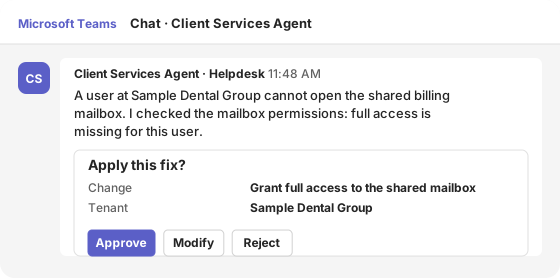
The engineer who owns the ticket gets each proposed fix as an approval card in a one-to-one Teams chat. Approvals use Microsoft Teams Adaptive Cards, so they work on desktop and mobile.
A user at Sample Dental Group cannot open the shared billing mailbox. I checked the mailbox permissions: full access is missing for this user.
- Change
- Grant full access to the shared mailbox
- Tenant
- Sample Dental Group
Illustration with sample data.
Specialist · Helpdesk
Helpdesk: an AI customer service agent for Microsoft 365 requests
Helpdesk works through client requests after Triage has sorted them, reviews each ticket and prepares the Microsoft 365 fix for a person to approve, so clients get answers faster. It watches response times against the service levels we agreed, and every change it proposes waits for a person.
Audit modeHelpdesk · part of the Client Services Agent
Works through client requests and prepares the Microsoft 365 fix for a person to approve, so clients get answers faster.
What it works on
- Ticket review (level 2)
- SLA watch
- Change proposals
Specialist · Cloud Assessment
Cloud Assessment: license, usage and Azure cost reviewed read-only
Cloud Assessment collects license, usage, Azure cost and Azure Advisor data from a client’s Microsoft tenant with read-only access, for our cost and license reviews. It never changes anything in the tenant.
LiveAssessment · part of the Client Services Agent
Reviews each client's Microsoft 365 and Azure every month: security gaps, unused licences and what is driving cloud cost, written up as a plain report. Read-only: it never changes anything in a client's systems, and a person reviews every report before it reaches the client.
What it works on
- Monthly Microsoft 365 and Azure review
- Customer reports
Live record
What it actually did
Straight from the audit log the agent writes on every action, for every specialist above. Filter by specialist or by outcome; the misses are shown as plainly as the wins.
Live log · last 7 days · updated Oct 21, 2026, 19:28 UTC · times in UTC
Tue, Oct 20
Mon, Oct 19
Fri, Oct 16
Human control
Where a person stays in charge
The agent acts on its own only within rules we set. Anything that affects a customer, money, a bid or a candidate waits for a person.
A person approves every change
No change reaches a client’s Microsoft 365 tenant until a person approves it.
Read-only by design
Cloud Assessment reads data only; it cannot change a client’s tenant.
Every action logged
Each step, tool call and approval is written to the audit log, which feeds the activity log on this page.
Switched off in one step
Each agent has a daily cost cap and a kill switch, and is pinned to one model tier, so cost and behavior stay predictable.
For your business
Put an agent like this to work for your team
If your service desk spends its day on the same Microsoft 365 requests, the same AI IT support agent can review each ticket, prepare the fix and leave only the approval to your engineers. Each agent can be powered by OpenAI, Anthropic, Google or open-source models, chosen per task, and we tell you where each model processes your data. It is one of the AI agents for business we run in our own company every day.
Microsoft 365 requests
Mailbox, license and access requests prepared for one-click approval.
Service-level watch
Tickets close to their target flagged before they breach.
Cleaner queues
Tickets arrive sorted, because Triage reads every inbox first.
| Engagement | Typical timeline | Investment |
|---|---|---|
| AI readiness assessment | About one week | Free |
| First agent pilot: one process, shadow mode | 4–6 weeks | $14,900 |
| Production agent with integrations and approvals | 6–10 weeks | $24,900–$49,900 |
| Managed AI operations | Monthly | From $1,900 a month |
Want a figure for your organization? Get an estimate in 2 minutes with our pricing calculator.
Prices are our standard US list prices for commercial clients. Model usage is billed at cost and capped per agent per day.
Common questions
AI helpdesk: questions service teams ask
What is an AI helpdesk?
An AI helpdesk uses AI to work support tickets: reading each request, classifying it and preparing the answer or the fix. Ours prepares the Microsoft 365 change and leaves the approval to a person, so clients get faster answers without an agent changing their tenant on its own.
Can an AI customer service agent resolve tickets on its own?
Ours does not apply changes on its own. It reviews the ticket, prepares the fix and waits for a person to approve it. Sorting and routing are handled first by Triage in our AI Command Center.
What is AI IT support for Microsoft 365?
It is an agent that works Microsoft 365 requests through Microsoft’s own management APIs, such as Microsoft Graph, with permissions limited to what the request needs. Every change it proposes is recorded with the approval behind it.
Which AI models does the agent use?
It can be powered by OpenAI, Anthropic, Google or open-source models, chosen per task. OpenAI, Anthropic and open-source models run in Microsoft Foundry on Azure; Google’s Gemini models run on Google Cloud. We tell you which model is used and where it processes your data before work starts, and prompts and outputs are not used to train the models.
Questions buyers ask
Before you decide
Does the agent change our tenant without approval?
No. Every change to a Microsoft 365 tenant waits for a person to approve it, and every approval is logged.
Which helpdesk does it work with?
Ours runs in our own helpdesk. For clients, we connect the agent to the helpdesk you use through its API and agree which requests it may prepare.
Can it handle license changes?
License and seat changes go to our Sales Inbound Agent, which handles every license order; the helpdesk routes those requests there.
Find the first process worth automating
Start with a free AI readiness assessment: we look at where AI is in use, what data it touches and which process to automate first.

