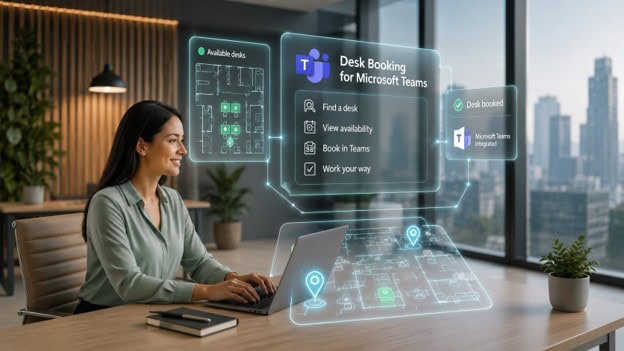
Best Desk Booking Software for Microsoft Teams
Last Updated 2 months ago ago
Sponsored content. This article is sponsored by Archie and contains a link to the sponsor’s website. It is provided for general information and does not constitute an endorsement by Communication Square.
Microsoft Teams is already where many organizations manage daily communication, meetings, and collaboration. As hybrid work becomes more common, it also makes sense for employees to book desks, check office schedules, and coordinate in-office days from the same place.
Microsoft does offer native workplace features through Microsoft Places and Microsoft 365. For some organizations, that may be enough. But many teams eventually need more than basic desk reservations, especially when they want interactive floor plans, flexible booking rules, desk usage analytics, visitor management, or support for other workplace resources.
That is why many companies connect Microsoft Teams with dedicated desk booking software. Employees can keep using the Microsoft tools they already know, while workplace teams get more control over desks, meeting rooms, occupancy data, and the overall office experience.
In this guide, we compare the best desk booking software for Microsoft Teams, including tools for simple desk reservations, hybrid office coordination, workplace analytics, and broader workplace management.
Do you need desk booking software for Microsoft Teams?
The short answer is: probably yes.
Microsoft Teams is where many employees already communicate, collaborate, and plan their workdays. Naturally, it makes sense to book desks there too.
The good news is that Microsoft now offers Microsoft Places, a workplace management platform built directly into the Microsoft ecosystem. Employees can book desks, see office presence information, coordinate office attendance, and access workplace data through Teams, Outlook, and Microsoft 365.
The challenge is that Microsoft Places is primarily designed around Microsoft’s ecosystem. Many companies eventually discover they need additional features such as:
- More flexible booking rules
- Advanced desk occupancy analytics
- Mobile desk booking app
That’s why some organizations decide to combine Microsoft 365 with a dedicated desk booking system and integrate it with Teams.
Best desk booking software for Microsoft Teams compared
| Software | Best For | Teams Integration | Starting Price |
| Archie | Best overall | Native Teams & Outlook booking | $2.80/desk/month |
| Officely | Teams-first simplicity | Lives inside Teams | $2.50/user/month |
| Robin | Enterprise workplace analytics | Strong Teams integration | Custom pricing |
| OfficeRnD Workplace | Mid-market hybrid offices | Teams & Outlook integration | Starting from $99/mo |
| Envoy | Desk booking + visitors | Teams notifications & integrations | $5/resource/month + platform fee |
1. Archie — Best desk booking software for Microsoft Teams overall
If your employees already spend most of their day in Microsoft Teams and Outlook, Archie is probably one of the most complete desk booking software you can add to your Microsoft environment.
What we like most is that Archie doesn’t ask employees to learn an entirely new workplace platform. Instead, it extends Microsoft Teams, Outlook, and Microsoft 365 with workplace management features that Microsoft’s native tools don’t always provide.
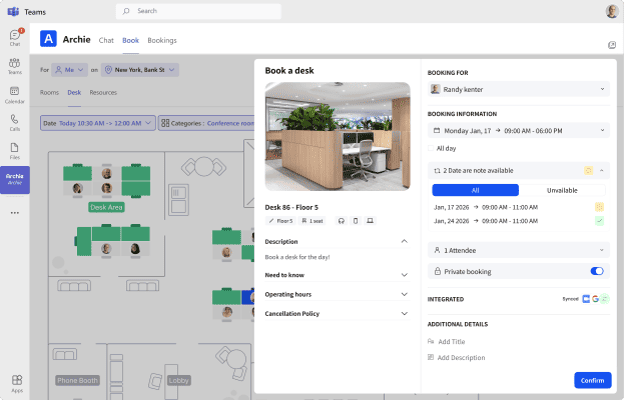
Employees can book desks, meeting rooms, and other workplace resources directly from Teams and Outlook. They can see who is coming into the office, find teammates on interactive floor plans, check availability in real time, and receive booking reminders without leaving the Microsoft apps they already use every day.
From the employee’s perspective, the experience feels very familiar. From the workplace team’s perspective, however, Archie adds a lot more control and visibility behind the scenes.
For example, workplace managers can create booking policies, manage hybrid work schedules, track occupancy trends, monitor desk and room utilization, manage visitors, and access detailed workplace analytics. All bookings stay synchronized across Microsoft Teams, Outlook, Microsoft 365, Archie mobile apps, web portals, room displays, and kiosks through a two-way sync.
Key features
- Book desks, meeting rooms, and other resources directly from Teams
- Interactive floor plans with live availability
- Find teammates and coordinate office days
- Real-time desk and room availability
- Automated reminders and booking check-ins
- Workplace analytics and occupancy reporting
- Microsoft Entra ID integration
- Single sign-on (SSO) and SCIM provisioning
- Two-way synchronization across Microsoft 365
Pricing
Archie starts at $2.80 per desk per month with a $159 monthly minimum. Unlike many competitors, pricing is based on desks rather than users.
Best for
Mid-sized and larger organizations that want to extend Microsoft Teams into a complete desk-booking software platform.
2. Officely — Best for Teams-first simplicity
Officely is not really a standalone desk booking tool, but a powerful integration that brings desk booking directly into Microsoft Teams.
That’s a smart idea, especially for smaller teams. One of the biggest challenges with workplace software isn’t the features. It’s getting employees to actually use it. Since many employees already spend most of their day inside Teams, Officely removes a lot of that friction. Employees can book desks, check who’s coming into the office, coordinate schedules, and manage reservations without switching between applications.
What we like most is how much emphasis Officely puts on office coordination rather than simply desk reservations. Team members can update their work location directly in Teams, whether they’re working from home, in the office, or traveling. Employees can see who plans to be in the office each day and even receive recommendations on the best days to come in based on colleague attendance. The goal is to make office days more collaborative and intentional rather than leaving employees guessing whether anyone else will be there.
That simplicity does come with some tradeoffs, though. Officely is intentionally lightweight compared to broader workplace platforms. You won’t find advanced interactive floor plans, extensive occupancy analytics, complex workplace policies, or the deeper workplace operations tools offered by other platforms on this list.
Key features
- Desk booking directly inside Microsoft Teams
- Work location statuses (office, home, traveling, etc.)
- Team attendance visibility
- Assigned and flexible desks
- Desk check-ins and auto-release
- Meeting room booking
- Parking management
- Team office-day chats
Pricing
For desk booking, Officely offers one of the most affordable entry points in this category: there’s a free plan for up to 5 users, and the basic one starts at $2.50/user/month.
Best for
Small organizations that live inside Microsoft Teams and want the simplest possible desk booking experience.
3. Robin — Best for enterprise workplace analytics
Robin is one of the strongest workplace management platforms for larger organizations, especially companies that want to make workplace decisions based on real data rather than guesswork.
It also has one of the stronger Microsoft Teams integrations in this category. Instead of treating Teams as just another notification channel, Robin allows employees to manage much of their workplace experience directly inside Teams.
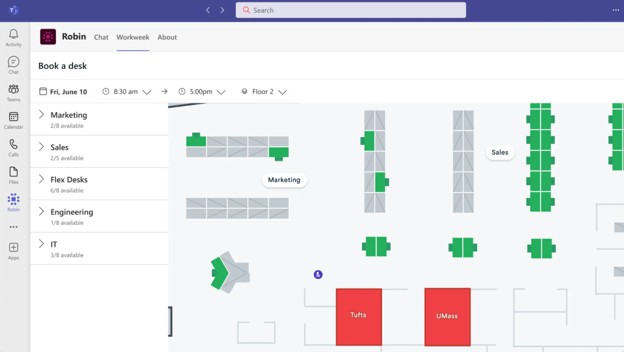
Employees can view their weekly schedule, indicate when they plan to come into the office, book desks, reserve meeting rooms, see who else is coming in, and receive reminders about upcoming reservations without leaving Teams.
The desk booking experience inside Teams is also quite polished. Employees can open an interactive office map, browse available desks, view amenities, and reserve spaces directly from the Teams interface. Robin can even suggest rooms for upcoming meetings that do not yet have a space assigned, helping employees find and book rooms without jumping between multiple systems.
The tradeoff is that Robin is not a lightweight solution. It is clearly built for enterprise environments. The platform includes a large number of features, settings, integrations, and reporting tools, which can make implementation and administration more involved than simpler Teams-focused solutions.
Key features
- Microsoft Teams desk booking
- Microsoft Teams room scheduling
- Interactive office maps
- Workplace attendance planning
- “Who’s coming in” visibility
- Meeting and desk reservation reminders
- Enterprise reporting and data exports
Pricing
Robin uses custom enterprise pricing based on company size, locations, and feature requirements. Pricing is not publicly available, so organizations need to contact Robin directly for a quote.
Best for
Large enterprises that want Microsoft Teams desk booking combined with deep workplace analytics.
4. OfficeRnD Workplace — A mid-market alternative
OfficeRnD Workplace sits somewhere between Microsoft Places and enterprise-heavy platforms like Robin.
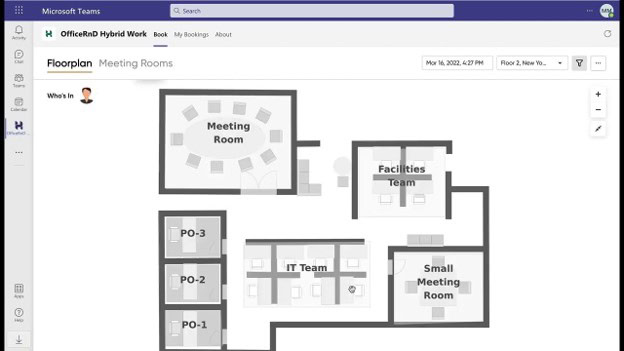
What we like about OfficeRnD is that it offers many of the workplace management features larger enterprises want, while still feeling accessible to mid-sized organizations. It combines desk booking, room scheduling, hybrid work planning, workplace analytics, and employee engagement tools in a platform that integrates closely with Microsoft Teams, Outlook, and Microsoft 365.
One feature that stands out is colleague visibility. Employees can see who plans to be in the office, search for coworkers by name, locate where they are sitting, and reserve a nearby desk. For hybrid teams, that makes office days much easier to coordinate and helps ensure employees are actually coming in when the people they need to collaborate with are there.
The main thing I’d watch is that OfficeRnD’s roots are still very much in coworking and flex space management. While the Workplace product is designed for corporate offices, some parts of the platform still feel more tailored to workspace operators than traditional office teams. Features, terminology, and workflows occasionally reflect that heritage. For organizations focused purely on internal workplace management, platforms built specifically for corporate offices may feel a bit more intuitive out of the box.
Key features
- Desk booking directly from Microsoft Teams
- Meeting room scheduling in Teams and Outlook
- Interactive office maps
- Office attendance planning
- Colleague search and workplace visibility
- Booking check-ins
- Outlook and Microsoft 365 synchronization
Pricing
OfficeRnD Workplace starts at $99 per month for up to 150 users, with costs scaling up depending on the feature tiers and active bookable resources.
Best for
Mid-sized and growing organizations that want a dedicated workplace management platform deeply integrated with Microsoft Teams.
5. Envoy Reservations — Best for workplace management with a higher budget
Similar to most tools on this list, Envoy also combines desk booking with a broader workplace operations platform. Employees can reserve desks and other workplace resources, while front-desk teams can manage guest arrivals, delivery notifications, and visitor workflows in the same ecosystem.
What’s interesting is that its Microsoft Teams integration is especially useful for visitor and delivery notifications. When a visitor signs in or a delivery arrives, employees can receive a direct message from the Envoy bot in Teams. They can also respond with one click, so the front desk knows whether they are on their way. This helps reduce waiting time for visitors and keeps employees updated without asking them to check another app.
That said, Envoy’s Teams integration is not as desk-booking focused as some other tools on this list. It is strongest when Teams is used as a notification layer for workplace events, especially visitor arrivals and deliveries. If your main priority is booking desks directly inside Teams, other tools on this list should feel more natural.
Key features
- Desk booking and workplace reservations
- Workplace security workflows
- Microsoft Teams visitor & delivery alerts
- One-click Teams replies
- Desktop and mobile Teams notifications
- Workplace operations reporting
Pricing
Envoy Reservations starts at $5 per bookable resource/month, billed annually, plus Envoy’s platform fee.
Best for
Organizations where visitor management, deliveries, workplace security, and front-desk operations matter as much as desk reservations.
How to choose the right Microsoft Teams desk booking software
Microsoft Teams has become the center of workplace collaboration, so it makes sense that desk booking is moving there too.
For organizations that want the most native experience possible, Microsoft Places is the obvious starting point. But for many offices, desk booking is only one part of a much bigger workplace experience. Interactive floor plans, coworker visibility, visitor management, mobile apps, and workplace analytics often become just as important.
Here’s how I’d think about it when choosing the right software:
- Choose Archie if you want the best balance of Teams integration, employee experience, visitor management, mobile access, and transparent pricing.
- Choose Officely if simplicity inside Teams matters more than advanced workplace management.
- Choose Robin if workplace analytics and enterprise planning are your top priorities.
- Choose OfficeRnD Workplace if you want a strong Microsoft-focused workplace platform with solid security credentials.
- Choose Envoy if visitor management is equally important as desk booking.
Still, Archie remains my top overall recommendation. It delivers the Microsoft Teams experience employees expect while adding the workplace management capabilities that most growing organizations eventually need.

Related Articles

Central Florida Is Becoming an Engineering Powerhouse
Last Updated 2 months ago ago Sponsored content. This article is sponsored by Futuristic Artists and contains a link to…
Read Article →
AI-Assisted Media Buying Is Becoming Standard in Advertising
Last Updated 3 months ago ago Sponsored content. This article is sponsored by Good Apple and contains a link to…
Read Article →
The Security Gap Many Companies Miss During AI Adoption
Last Updated 3 months ago ago Sponsored content. This article is sponsored by Ory and contains a link to the…
Read Article →Need help with your Microsoft solutions?
Speak with our certified experts and find the right path for your organization.